![smartbarrel-logo-1.png]](https://ask.smartbarrel.io/hs-fs/hubfs/smartbarrel-logo-1.png?height=39&name=smartbarrel-logo-1.png)
What do I need before enabling this feature?
A few settings must be turned on, before making use of the AI SMS Incident Classification feature:
- The Incident module must be activated in the company settings.
- Activate the worker SMS punch flow in project settings so workers receive the SMS messages.
- (optional) Activate Manager notification in project settings.
See How do I enable the Incident Summary? article for more details.
How do I turn on AI SMS Incident Classification?
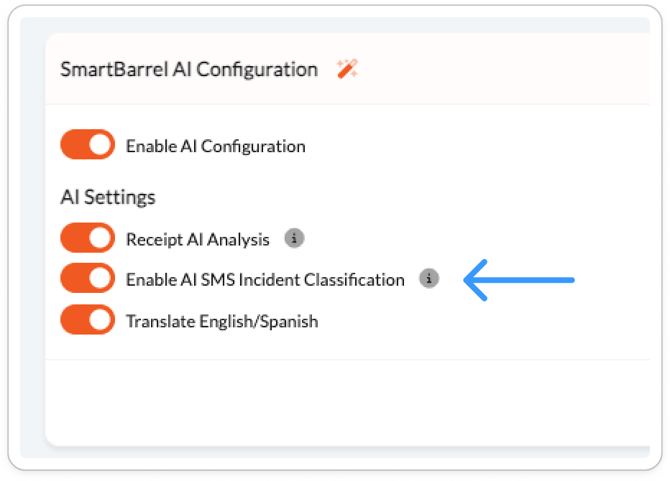
- Step 1 — Go to Company Settings → AI Configuration.
- Step 2 — Locate the Enable AI SMS Incident Classification toggle.
- Step 3 — Turn the toggle ON and save.
Does this apply to all projects automatically?
Yes. This is a company-level setting. Once enabled, it applies to every project where the Submit Claim SMS service is active. There is no per-project toggle for AI Classification.
What if I want to keep using the old SMS incident workflow without AI?
Simply leave the Enable AI SMS Incident Classification toggle OFF. The existing workflow remains fully intact and unchanged.
Note: ⚠️ Enabling AI Classification applies immediately across all active projects with SMS Incident configured. Review your project notification settings before turning it on to ensure the right managers are set up to receive alerts.