![smartbarrel-logo-1.png]](https://ask.smartbarrel.io/hs-fs/hubfs/smartbarrel-logo-1.png?height=39&name=smartbarrel-logo-1.png)
Accessing Company Settings
Navigate to Integrations > Foundation and click the menu icon (≡) in the upper right corner. Select Company Settings from the menu.
Company Settings controls the global behaviour of the Foundation integration for your entire company. Changes made here apply to all projects and workers synced through the integration.
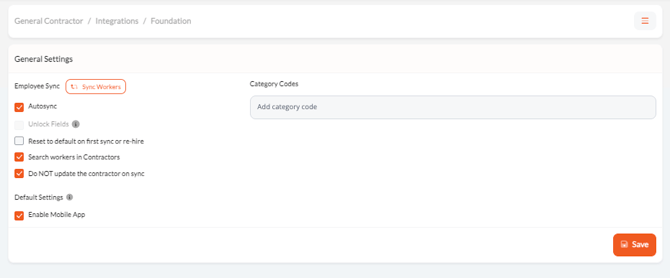
Employee Sync Settings
These settings control how workers are synced from Foundation into SmartBarrel.
Employee Sync Settings
These settings control how workers are synced from Foundation into SmartBarrel.
| Setting | Description |
|---|---|
| AutoSync | When enabled, SmartBarrel will automatically sync workers from Foundation on a recurring schedule. |
| Search Workers in Contractors | When enabled, SmartBarrel will also search the contractors table in Foundation when importing workers. |
| Do Not Update Contractor on Sync | When enabled, existing contractor records in SmartBarrel will not be overwritten during a worker sync. |
| Reset to Default on Relation Create | When enabled, worker settings will reset to their defaults when a new integration relation is created. |
| Enable Mobile App by Default | When enabled, newly synced workers will have mobile app access turned on automatically. |