![smartbarrel-logo-1.png]](https://ask.smartbarrel.io/hs-fs/hubfs/smartbarrel-logo-1.png?height=39&name=smartbarrel-logo-1.png)
Some job sites are run as several jobs in Spectrum. Sub-jobs let you link those extra jobs into one SmartBarrel project, so a single project tracks the cost codes from all of them, the same way you can with CMiC, Foundation, and Vista.
Before you start
- The main job must already be imported or merged into a SmartBarrel project (see: How do you Sync Projects with Spectrum?).
Link an additional job
- Open the project's Spectrum settings from Integrations > Spectrum > Projects.
- In the sub-jobs table below the settings card, search for the job you want and press Enter.
- Tick the job, or several jobs, and click Sync Selected.
- Confirm when prompted. The confirmation tells you how many jobs you selected.
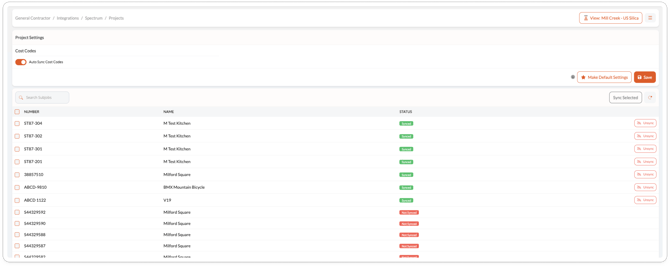
Linked jobs show a Synced status with an Unsync action beside them.
Two jobs never appear as available: the job already linked as the project itself, and any job already linked as a project elsewhere in SmartBarrel. If you try to link one of those, SmartBarrel tells you it is already mapped rather than linking it twice.
What happens to the project's cost codes?
The next Cost Code Sync brings in the cost codes from the main job and every linked job together.
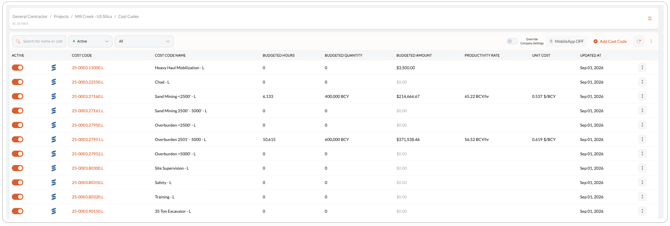
Because two jobs can use the same phase and cost type, cost codes gain the job number at the front once a sub-job is linked. A code that read 251001.L becomes something like 1451.251001.L. Your existing cost codes are updated in place rather than duplicated, so the time already recorded against them is kept, and the cost code names continue to show which job each one came from.
Unlink a job
Click Unsync on the linked job in the sub-jobs table. On the next Cost Code Sync, that job's cost codes are deactivated while the main job's cost codes stay active. If you unlink the last sub-job, codes return to the shorter phase and cost type form.
FAQ
Why would I use this?
If one physical job site is set up as several jobs in Spectrum, linking them lets your crews clock in against all of those cost codes from a single SmartBarrel project.
Will my existing cost codes be duplicated?
No. They are matched and updated in place when the code format changes.