![smartbarrel-logo-1.png]](https://ask.smartbarrel.io/hs-fs/hubfs/smartbarrel-logo-1.png?height=39&name=smartbarrel-logo-1.png)
Foundation is the source of truth for your workers, jobs, sub jobs, and cost codes. Once the integration is connected, SmartBarrel imports that data from Foundation so your crews can clock in on the right jobs and cost codes without anyone setting them up by hand. Approved time can then be sent back to Foundation for your payroll team to review.
Foundation stores your data in a SQL Server database rather than offering a web service, so SmartBarrel connects to that database directly using a user you create in Foundation.
Is this the right article for you?
This article is for companies on Foundation Hosted, where your Foundation database runs in Foundation Software's cloud. This is the standard setup and there is nothing to configure on your network.
If your Foundation database runs on a server inside your own network, follow How do you Set Up the Foundation Integration (On-Premise)? instead. That setup needs extra work from your IT team before the connection will succeed.
Not sure which one you are? The server address is the quickest clue. A public hostname from Foundation Software means you are hosted. An address like 192.168.1.50 or 10.0.0.20, or a name ending in .local, means the database is on a server inside your own network. If you are still unsure, ask your Foundation representative before you start.
What you'll need
- A dedicated SmartBarrel user in your Foundation database (created in Step 1 below)
- Your Foundation connection details: Server, Port, Database, User, and Password
- Write access to pending timecards for that user, if you want SmartBarrel to send time back to Foundation
- SmartBarrel admin access to the Integrations page
Step 1: Create a SmartBarrel user in Foundation
- Recommended username: SmartBarrel. Keeping this consistent makes support faster.
- Choose a password for the user.
- Ask Foundation Software to grant that user write permissions to the pending timecards table. This is what allows SmartBarrel to send approved time back to Foundation. If you only want to import data and never export time, this step is optional.
Step 2: Get your connection details
Foundation Software provides these for hosted customers. You will need all five:
- Server: the hostname or IP address of the SQL Server running Foundation.
- Port: the port that SQL Server listens on. The standard default is 1433, but confirm it rather than assuming.
- Database: the name of your Foundation database.
- User: the SQL Server user from Step 1.
- Password: the password for that user.
Step 3: Connect SmartBarrel to Foundation
- In SmartBarrel, click Integrations in the left-hand sidebar.
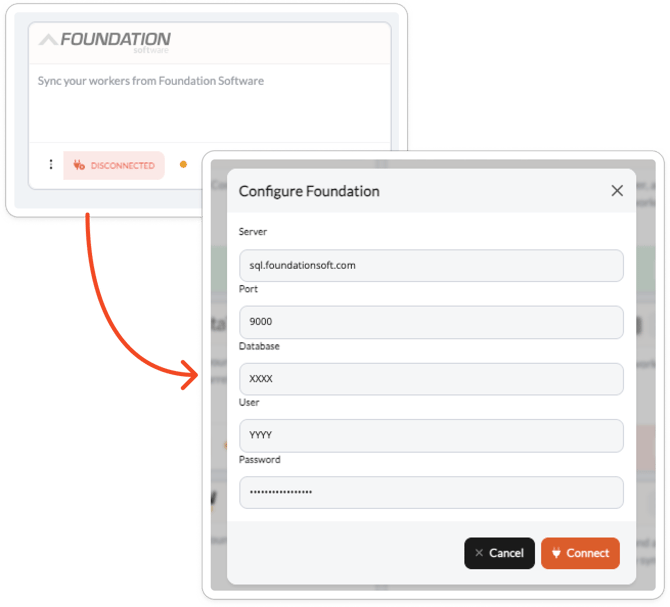
- Find the Foundation card and click Connect.
- Enter your Server, Port, Database, User, and Password.
- Click Connect.
SmartBarrel runs a quick test against your database when you click Connect. If something is not right, you can correct it in the same window and try again without starting over.
What you can sync
Once you are connected, you can import:
- Workers (see: Can you Sync Workers with Foundation?)
- Jobs as projects (see: How do you Sync Projects with Foundation?)
- Sub jobs (see: How do you Map Sub-jobs with Foundation?)
- Cost codes (see: How do you Sync Cost Codes with Foundation?)
Approved time can also be sent from SmartBarrel back into Foundation's pending timecards, where your payroll team reviews and posts it. Nothing is posted in Foundation automatically.
Troubleshooting
| Problem | Cause | Fix |
|---|---|---|
| "Foundation Auth failed, check credentials" | The user or password is wrong, or the user does not have access to that database | Confirm the details with Foundation Software. The same message also appears if SmartBarrel cannot reach the server at all, so if the credentials are definitely correct, confirm the Server and Port are the ones Foundation Software gave you. |
| The connection times out | The Server address is an internal one, such as 192.168.x.x, 10.x.x.x, or a name ending in .local | That address means your database is on your own server, not Foundation Hosted. Follow the On-Premise article instead. |
| The connection is refused | The Port is wrong | Confirm the port with Foundation Software. It is usually 1433. |
| The connection works but timecards will not export | The SmartBarrel user does not have write access to pending timecards | Ask Foundation Software to grant that permission for your SmartBarrel user. |
| Nothing appears after connecting | No projects have been imported yet | Import the projects you want to track. Sub jobs come in under their parent project. |
| A job is missing from the list | The job is closed in Foundation | Only active jobs are available to map. A job already linked to a SmartBarrel project is not affected when it closes later. |
FAQ
Do I need to open anything on our firewall?
No. On Foundation Hosted your database is already reachable, so there is no network work on your side. That requirement applies only to companies running Foundation on their own server.
What can SmartBarrel do with the user we create?
SmartBarrel reads your employees, jobs, sub jobs, and cost codes. If you turn on timecard export, it also writes approved time into Foundation's pending timecards for your team to review and post. It does not post anything in Foundation on its own.
Can we use an existing Foundation user instead of creating one?
You can, but a dedicated user is recommended. It makes the connection easy to identify, and it means you can change or revoke SmartBarrel's access without affecting anyone else.
We have more than one Foundation company. Can we sync all of them?
Each SmartBarrel connection uses one Foundation company. If you need several, contact SmartBarrel support and we will walk through the options with you.
How often does data update?
Workers and cost codes can sync automatically on a schedule, which you set in Company Settings. You can also sync at any time by hand.
What happens if we change the password in Foundation?
The connection will start failing. Reconnect from the Foundation card on the Integrations page and enter the new password.