![smartbarrel-logo-1.png]](https://ask.smartbarrel.io/hs-fs/hubfs/smartbarrel-logo-1.png?height=39&name=smartbarrel-logo-1.png)
Spectrum tracks job costs as phases, each with a cost type. SmartBarrel imports those as cost codes on the linked project, so your crews record time against the same structure you use for job costing.
Before you start
- The Spectrum job must be imported or merged into a SmartBarrel project (see: How do you Sync Projects with Spectrum?).
- You need the Sync Costcodes permission for Spectrum to run a sync.
Sync cost codes
- Open the project and go to its overview page.
- On the Spectrum card, click Sync Cost Codes.
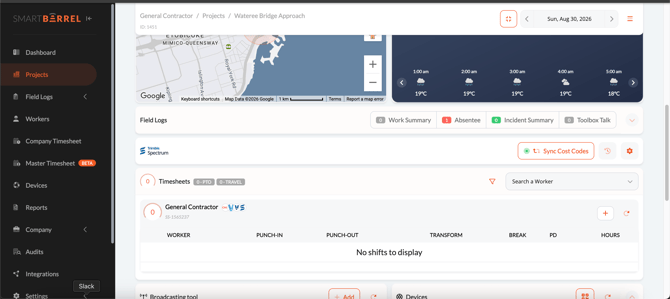
The sync is queued and runs in the background. Hover the marker beside the button to see the last run's outcome, when it ran, and who ran it.
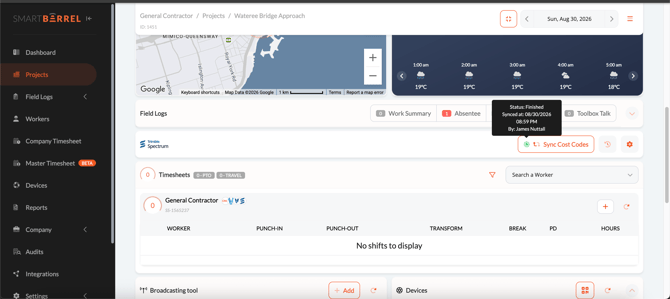
To keep a project's cost codes up to date automatically, turn on Auto Sync Cost Codes in that project's Spectrum settings.
How cost codes are named
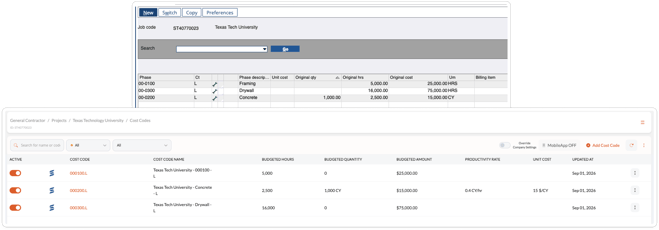
Each phase and cost type pair becomes one cost code.
- Code: the phase and its cost type, for example
251001.L. If the project has sub-jobs linked, the job number is added to the front so codes from different jobs stay distinct. - Name: the job description, the phase description, and the cost type, for example Wateree Bridge Approach - Place Asphalt Base - L. When a phase has no description, the phase code is used instead.
| Cost Code Field | Comes from Spectrum | Required? |
|---|---|---|
| Code | Phase code and cost type, plus the job number when sub-jobs are linked | Yes |
| Name | Job description, phase description, and cost type | Yes |
| Unit of Measure | Unit of measure | No |
| Budgeted Quantity | Original estimated quantity | No |
| Budgeted Hours | Original estimated hours | No |
| Budgeted Amount | Original estimated cost | No |
SmartBarrel works out the productivity rate and unit cost from the budget values.
Choose which cost types to import
Cost Types in Company Settings controls which of your Spectrum cost types become cost codes. It applies to every project.
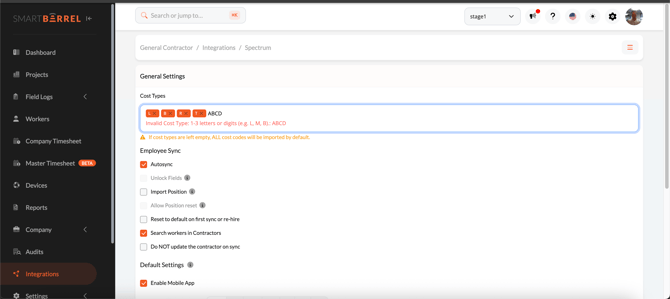
- Type a cost type and add it as a tag. Each is one to three letters or digits, for example L, E, or M.
- The default is L for Labor.
- Leaving the field empty imports every cost type, which can be a large increase in the number of cost codes on a project.
Cost types are whatever your company uses in Spectrum, so this field is free entry rather than a fixed list. If a cost type no longer matches your list, cost codes imported under it are deactivated rather than deleted, and the time already recorded against them is kept.
Why is a cost code missing?
- Its cost type is not in your Cost Types list.
- The phase is not active in Spectrum. Only active phases import.
- Two phases would produce the same code. When that happens, both are skipped and noted in the run log so nothing is imported under the wrong name.
- The change is newer than the last delivery of your Spectrum data.
Read the sync log
Cost code runs appear under Integrations > Spectrum > Logs, where you can filter to Cost Codes. Each run shows its outcome and how many cost codes were synced against the total. Click Download for the full detail, including any phases that were skipped.
FAQ
Do budgets update when they change in Spectrum?
Yes. Each sync refreshes the unit of measure and budget values on the cost codes it imports.
What happens to cost codes I no longer import?
They are deactivated, not deleted, so historical time stays intact.
Can I add my own cost codes to a Spectrum project?
Yes. Cost codes you create in SmartBarrel are left alone by the sync.