![smartbarrel-logo-1.png]](https://ask.smartbarrel.io/hs-fs/hubfs/smartbarrel-logo-1.png?height=39&name=smartbarrel-logo-1.png)
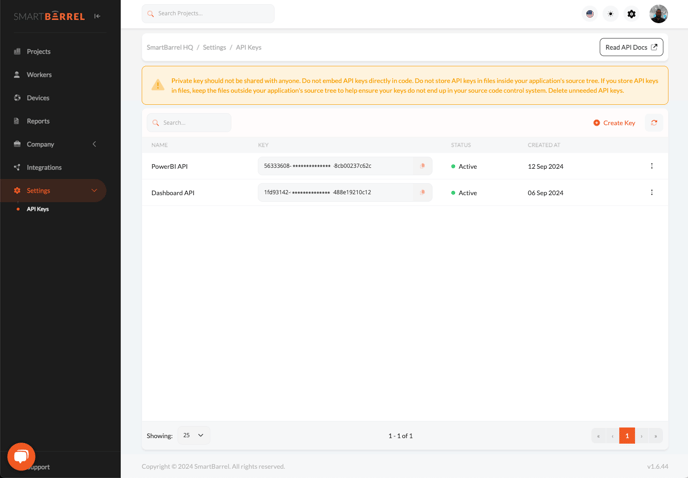
To access the SmartBarrel API 2.0, please contact SmartBarrel to request access. Only Admin Users can generate and manage API keys, which can be found under Settings > API Keys in the SmartBarrel Dashboard.
Important:
- The SmartBarrel API 2.0 offers both read and write capabilities for managing contractors, workers, projects, timesheets, and more.
- Only Admins have the ability to generate and handle API keys.
For a comprehensive guide on using the SmartBarrel API, visit our full documentation at docs.smartbarrel.io.
API Keys
- One time generated key, make sure to copy and save the generated keys.
- Keys can be renamed, regenerated, Disabled or Deleted.
Key Highlights:
- API Keys: Generated and managed by Admin Users under Settings > API Keys.
- Endpoints: Manage contractors, workers, projects, and other key elements with dedicated endpoints.
- Support: For assistance, contact support@smartbarrel.io or use the support widget on the dashboard.
Visit docs.smartbarrel.io for the complete documentation.