---
title: How do I add Cost Codes to my project?
description: "This article will show you the process of creating cost codes from the project. \n\nBy adding cost codes to your projects, it will help you to effectively track and manage expenses on a project's budget."
---
[Skip to content](https://ask.smartbarrel.io/how-do-i-add-company-cost-codes#main-content)
English
Show submenu for translations
[Customer portal](https://ask.smartbarrel.io/ticketsview?hsLang=en)
![smartbarrel-logo-1.png\]](https://ask.smartbarrel.io/hs-fs/hubfs/smartbarrel-logo-1.png?height=39&name=smartbarrel-logo-1.png)
- Home
- Products
- Pricing
- Blog
- Company
Open main navigation
Close main navigation
- Home
- Products
- Pricing
- Blog
- Company
- English
Show submenu for translations
- [Customer portal](https://ask.smartbarrel.io/ticketsview)
- Go to Dashboard
Go to Dashboard
Search the SmartBarrel Knowledge Base
- There are no suggestions because the search field is empty.
1. [SmartBarrel Knowledge Base](https://ask.smartbarrel.io/?hsLang=en)
2. [SmartBarrel Dashboard](https://ask.smartbarrel.io/smartbarrel-dashboard?hsLang=en)
3. [Project Settings](https://ask.smartbarrel.io/smartbarrel-dashboard?hsLang=en#project-settings)
# How do I add Cost Codes to my project?
## This article will show you the process of creating cost codes from the project. By adding cost codes to your projects, it will help you to effectively track and manage expenses on a project's budget.
#### There are three different ways to add a cost code to a project:
- Create a single cost code
- Import cost codes from an existing project
- Import multiple cost codes using a file template
#### Things to Consider:
- Only users with "Admin" level permissions can add cost codes
- There is no limit on the number of cost codes you can create
- There is no limit on the number of cost codes you can assign to each worker
- Customize the "Cost Code Name " Field as needed
- Enable productivity requirements for Shift approval
#### To create a single cost code:
Step 1. From the "Projects" tab Click on the plus icon (+)
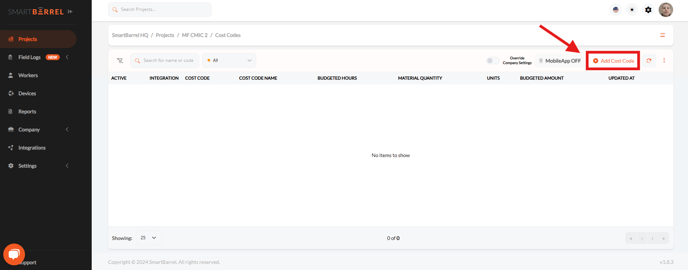
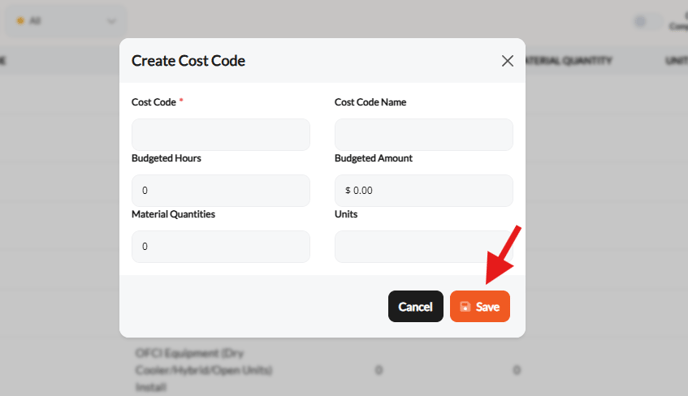
Step 2. Fill in the spaces with the required information (\* mandatory) - If the "Quantity" feature is enabled, make sure to also enter the budgeted hours/amount and material fields.
Click **" Save"**
Video:
#### How do I import cost codes from an existing project?
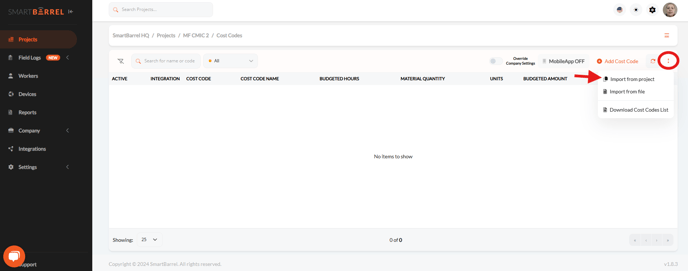
Step 1. Click the three-dot menu icon in the upper right \> select **"Import from project"**
Step 2. Select the project from where the cost codes will be copied \> Click **"Import"**
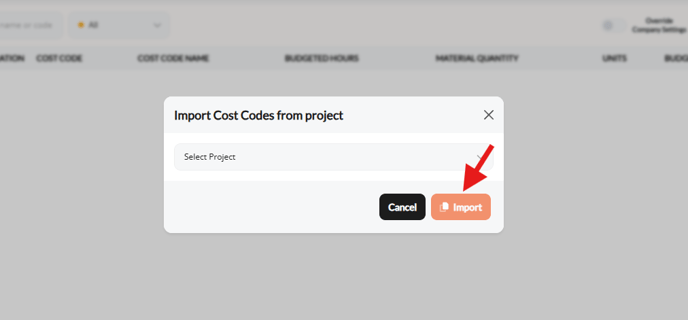
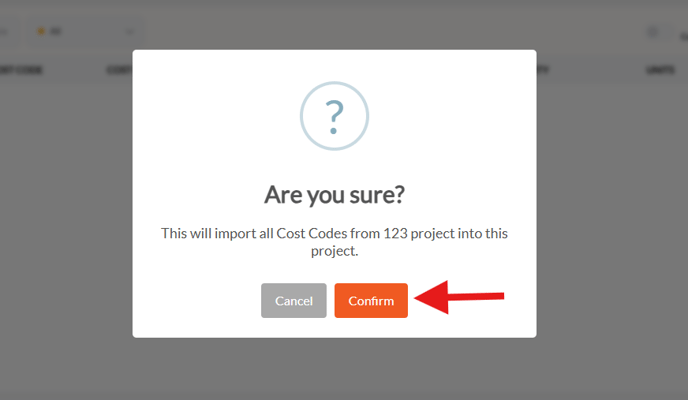
Step 3. Click **"Confirm"**
Video:
#### **How do I import multiple cost codes using a file template?**
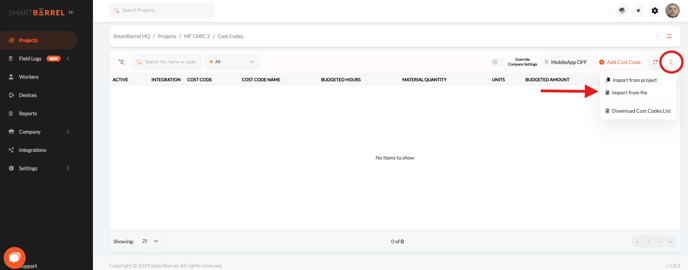
Step 1. Click the three-dot menu icon in the upper right \> select **"Import from File"**
Step 2. Click Download Template to download the Excel file to your computer.
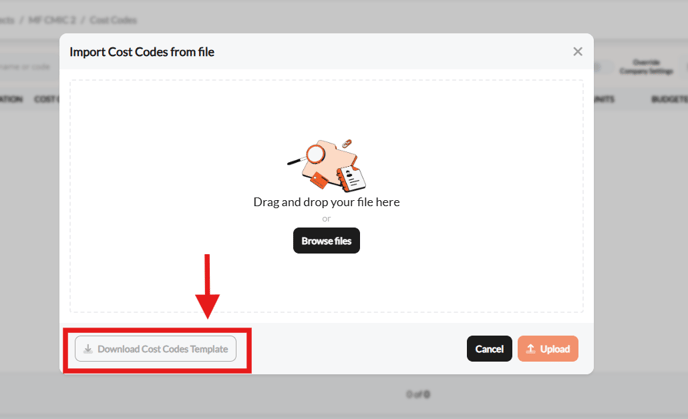
Tip: Consider using our pre-built import template, as it includes all of the required fields and formatting necessary for your import.
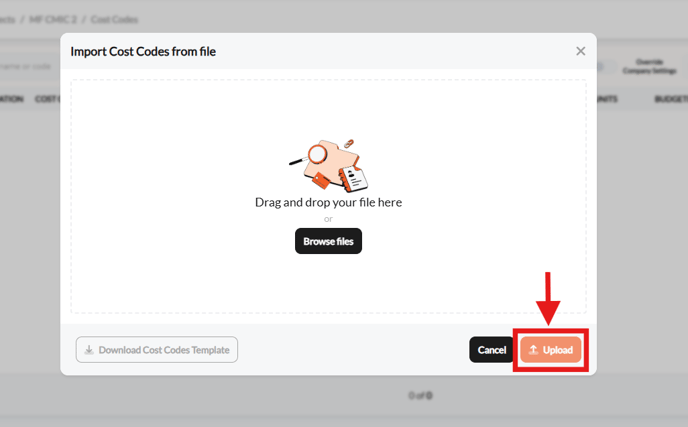
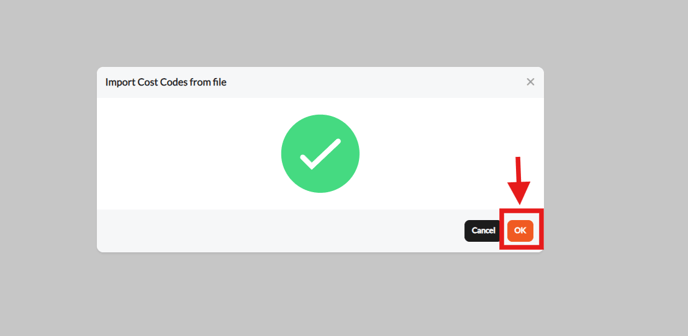
Step 3. Drag and drop the file in the panel box \> Click **"Upload" \> OK**
Video:
- [SmartBarrel Dashboard](https://ask.smartbarrel.io/smartbarrel-dashboard?hsLang=en#main-content)
- [Worker Profile Management](https://ask.smartbarrel.io/smartbarrel-dashboard?hsLang=en#worker-profile-management)
- [Project Settings](https://ask.smartbarrel.io/smartbarrel-dashboard?hsLang=en#project-settings)
- [Timesheet Management](https://ask.smartbarrel.io/smartbarrel-dashboard?hsLang=en#timesheet-management)
- [Productivity](https://ask.smartbarrel.io/smartbarrel-dashboard?hsLang=en#productivity)
- [Worker Vs User](https://ask.smartbarrel.io/smartbarrel-dashboard?hsLang=en#worker-vs-user)
- [Crew Management](https://ask.smartbarrel.io/smartbarrel-dashboard?hsLang=en#crew-management)
- [Reports](https://ask.smartbarrel.io/smartbarrel-dashboard?hsLang=en#reports)
- [Company Settings](https://ask.smartbarrel.io/smartbarrel-dashboard?hsLang=en#company-settings)
- [Security](https://ask.smartbarrel.io/smartbarrel-dashboard?hsLang=en#security)
- [PunchFlow and SMS Messages](https://ask.smartbarrel.io/smartbarrel-dashboard?hsLang=en#punchflow-and-sms-messages)
- [Microsoft SSO](https://ask.smartbarrel.io/smartbarrel-dashboard?hsLang=en#microsoft-sso)
- [Unions and Agreements](https://ask.smartbarrel.io/smartbarrel-dashboard?hsLang=en#unions-and-agreements)
- [Device and Solar](https://ask.smartbarrel.io/device-and-solar?hsLang=en)
- [Mobile App](https://ask.smartbarrel.io/mobile-app?hsLang=en#main-content)
- [Manage the Apps Settings](https://ask.smartbarrel.io/mobile-app?hsLang=en#manage-the-apps-settings)
- [Using the App](https://ask.smartbarrel.io/mobile-app?hsLang=en#using-the-app)
- [Integrations](https://ask.smartbarrel.io/integrations?hsLang=en#main-content)
- [Procore Integration](https://ask.smartbarrel.io/integrations?hsLang=en#procore-integration)
- [CMiC Integration](https://ask.smartbarrel.io/integrations?hsLang=en#cmic-integration)
- [API](https://ask.smartbarrel.io/integrations?hsLang=en#api)
- [Viewpoint Vista (App Xchange)](https://ask.smartbarrel.io/integrations?hsLang=en#viewpoint-vista-app-xchange)
- [Plexxis](https://ask.smartbarrel.io/integrations?hsLang=en#plexxis)
- [Foundation](https://ask.smartbarrel.io/integrations?hsLang=en#foundation)
- [BuildOps](https://ask.smartbarrel.io/integrations?hsLang=en#buildops)
- [Spectrum](https://ask.smartbarrel.io/integrations?hsLang=en#spectrum)
- [Feature Highlights](https://ask.smartbarrel.io/feature-highlights?hsLang=en)
- Home
- Products
- Pricing
- Blog
- Company
[](https://smartbarrel.io)
Copyright © 2026, SmartBarrel
```json
{
"@context" : "https://schema.org",
"@type" : "VideoObject",
"contentUrl" : "https://21020729.fs1.hubspotusercontent-na1.net/hubfs/21020729/Knowledge%20base%20V2/Add%20single%20cost%20code.mp4",
"dateModified" : "2026-03-31T16:52:51.173Z",
"duration" : "PT19.857S",
"height" : 804,
"name" : "Add single cost code",
"thumbnailUrl" : "https://21020729.fs1.hubspotusercontent-na1.net/hubfs/21020729/Knowledge%20base%20V2/Add%20single%20cost%20code.mp4/medium.jpg",
"uploadDate" : "2024-10-11T18:37:13.661Z",
"width" : 1920
}
```
```json
{
"@context" : "https://schema.org",
"@type" : "VideoObject",
"contentUrl" : "https://21020729.fs1.hubspotusercontent-na1.net/hubfs/21020729/Knowledge%20base%20V2/Cost%20code%20-%20import%20from%20project.mp4",
"dateModified" : "2026-03-31T16:52:51.213Z",
"duration" : "PT27.157S",
"height" : 804,
"name" : "Cost code - import from project",
"thumbnailUrl" : "https://21020729.fs1.hubspotusercontent-na1.net/hubfs/21020729/Knowledge%20base%20V2/Cost%20code%20-%20import%20from%20project.mp4/medium.jpg",
"uploadDate" : "2024-10-15T13:24:08.583Z",
"width" : 1920
}
```
```json
{
"@context" : "https://schema.org",
"@type" : "VideoObject",
"contentUrl" : "https://21020729.fs1.hubspotusercontent-na1.net/hubfs/21020729/how%20do%20I%20import%20multiple%20cost%20codes%20using%20a%20file%20template_.mp4",
"dateModified" : "2026-03-31T17:12:52.924Z",
"duration" : "PT45.173S",
"height" : 1080,
"name" : "how do I import multiple cost codes using a file template_",
"thumbnailUrl" : "https://21020729.fs1.hubspotusercontent-na1.net/hubfs/21020729/how%20do%20I%20import%20multiple%20cost%20codes%20using%20a%20file%20template_.mp4/medium.jpg",
"uploadDate" : "2024-11-08T18:04:53.027Z",
"width" : 1920
}
```